Viewing the trial balance
This guide shows you how to view the trial balance — the summary of movements and balances across all your accounts — then how to verify its equilibrium, interpret the key balances and export it. A balanced trial balance (ΣDebit balances = ΣCredit balances) confirms the integrity of your accounting.
Accessing the trial balance
Section titled “Accessing the trial balance”From the navigation bar: Financial Statements → Trial Balance.
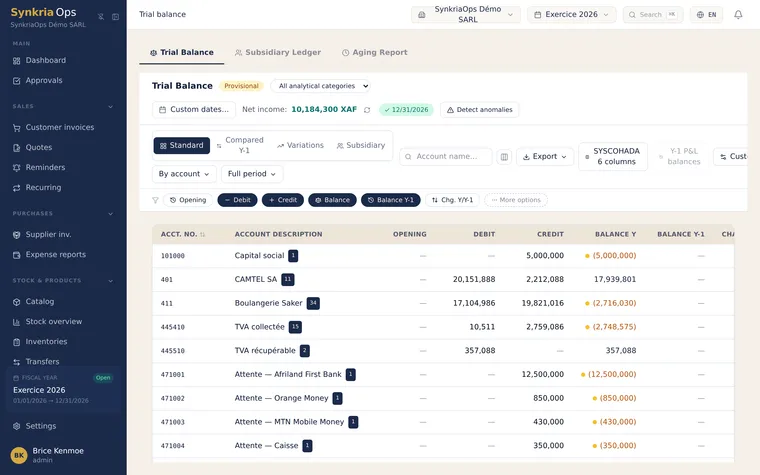
Choosing the right view
Section titled “Choosing the right view”Displays all accounts in the chart of accounts that have had at least one movement in the period. This is the reference view for a comprehensive check before a VAT return or year-end closing.
Typical use: monthly full review, balance sheet preparation, ΣD=ΣC verification.
Displays only third-party accounts: customers (411xxx), suppliers (401xxx), employees (422xxx). Each third-party sub-account appears on a separate line.
Typical use: check overall customer receivables, identify unsettled credit suppliers.
Detailed view of auxiliary accounts linked to each named third party. Shows the same data as THIRD PARTIES with the addition of the third-party name and code.
Typical use: submission to external accountant, customer portfolio verification.
Displays movements month by month for each account. Enables detection of a spike in expenses or revenue in a specific month.
Typical use: seasonal analysis, month-end adjustment checks.
Reading the trial balance columns
Section titled “Reading the trial balance columns”| Column | Description |
|---|---|
| Account | SYSCOHADA account number (e.g. 411001) |
| Label | Account description (e.g. Trade receivables — SARL ABC) |
| Debit movements | Total cumulative debits for the period in XAF |
| Credit movements | Total cumulative credits for the period in XAF |
| Debit balance | Net balance if debit > credit (asset accounts, expenses) |
| Credit balance | Net balance if credit > debit (liability accounts, income) |
The TOTALS line at the bottom of the page must show identical amounts in the Debit Balance and Credit Balance columns. This is the fundamental rule of double-entry bookkeeping.
Verifying the equilibrium ΣD = ΣC
Section titled “Verifying the equilibrium ΣD = ΣC”SynkriaOps blocks the posting of an unbalanced document (Debit ≠ Credit). If your trial balance is not in equilibrium, this usually means a manual import or data recovery has bypassed this control.
Interpreting balances
Section titled “Interpreting balances”Account 471001 with a balance — pending bank transactions
Section titled “Account 471001 with a balance — pending bank transactions”Account 471001 (Bank transfer accounts / Liaison accounts) shows a non-zero balance in the trial balance? This indicates bank transactions that have been imported but not yet posted to a document. Each line on this account represents a banking operation waiting to be matched to an accounting document (invoice, expense claim, etc.).
Action: open the general ledger of account 471001 and post each outstanding entry.
Account 4431 credit balance — VAT due to tax authorities
Section titled “Account 4431 credit balance — VAT due to tax authorities”If account 4431 (VAT collected) shows a credit balance of, for example, 1,475,000 XAF, this represents the VAT you have charged to your customers and must remit to the tax authority at your next return. An abnormally low or zero balance after a busy invoicing month warrants investigation.
Accounts 401xxx credit balances — amounts payable to suppliers
Section titled “Accounts 401xxx credit balances — amounts payable to suppliers”A credit balance on a supplier account (e.g. 401005 — Supplier BROSSARD SARL — 850,000 XAF) means you still owe them this amount. Cross-reference with the payment schedule to anticipate cash outflows.
Accounts 411xxx debit balances — amounts receivable from customers
Section titled “Accounts 411xxx debit balances — amounts receivable from customers”A debit balance on a customer account (e.g. 411003 — ENTREPRISE MVONDO — 2,360,000 XAF) represents the amount still owed by that customer. Use the THIRD PARTIES view to identify overdue accounts.
Reading an example trial balance
Section titled “Reading an example trial balance”| Account | Label | Debit mvt | Credit mvt | Debit balance | Credit balance |
|---|---|---|---|---|---|
| 101000 | Share capital | — | 10,000,000 | — | 10,000,000 |
| 401001 | Supplier IMPORT-TECH | 3,200,000 | 4,800,000 | — | 1,600,000 |
| 411001 | SARL ABC | 4,720,000 | 3,540,000 | 1,180,000 | — |
| 521001 | BICEC bank | 18,500,000 | 15,200,000 | 3,300,000 | — |
| 601000 | Merchandise purchases | 12,400,000 | — | 12,400,000 | — |
| 701000 | Merchandise sales | — | 28,300,000 | — | 28,300,000 |
| TOTALS | 38,820,000 | 51,840,000 | 16,880,000 | 39,900,000 |
Exporting the trial balance
Section titled “Exporting the trial balance”-
Select the desired view (GENERAL, THIRD PARTIES, AUXILIARY, PERIOD).
-
Adjust the period filter (start date / end date).
-
Click Export → Excel for an
.xlsxfile or Export → PDF for a printable report. -
The export includes your company header, the selected period, and the totals line.
Using the trial balance at month-end
Section titled “Using the trial balance at month-end”Before a monthly VAT return:
- Open the trial balance in GENERAL view.
- Check accounts
4431(VAT collected),4452(deductible VAT on purchases),4451(deductible VAT on capital assets). - Net VAT payable =
4431credit − (4452+4451) debit.
Before year-end closing:
- Verify that ΣDebit balances = ΣCredit balances (TOTALS line).
- Confirm that all
471xxxsuspense accounts have a zero balance. - Verify that account
12(Net result) is zero (it will be calculated automatically at closing).
Fixing common errors
Section titled “Fixing common errors”| Error | Likely cause | Solution |
|---|---|---|
| Unbalanced totals | Manual entry or incorrect import | Open the general ledger of the affected accounts to find the erroneous line |
| Account 471001 with persistent balance | Unreconciled bank transactions | Post each movement from the bank transaction list |
| Empty trial balance | No posted documents in the period | Check the status of your documents (DRAFT vs. POSTED) |
| THIRD PARTIES view empty | No third-party sub-accounts created | Check third-party setup and their accounting sub-accounts |
See also
Section titled “See also”- Viewing the general ledger — Zoom into the entries of a specific account to find the source of a discrepancy.
- Calculating the SYSCOHADA balance sheet — Turn your balanced trial balance into official financial statements.
- Exporting the FEC — Generate the regulatory file for tax audit or external accountant submission.