Sales & Invoicing
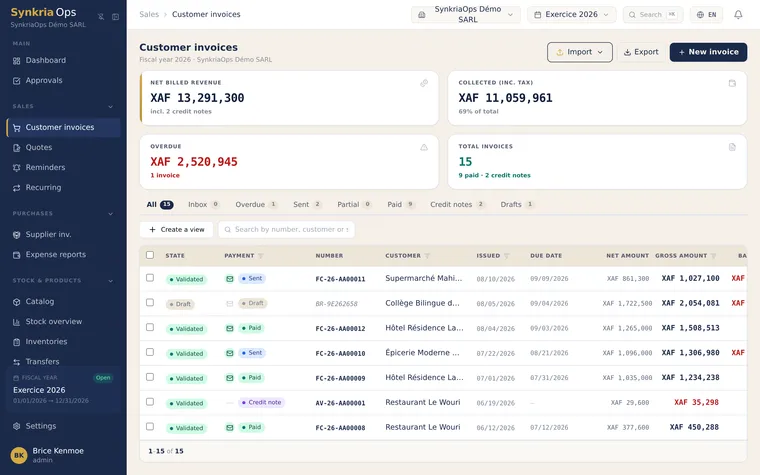
With the Sales module, you manage the entire commercial cycle: drafting quotes, invoicing, reminding customers about overdue invoices, and tracking payment. Each step automatically produces the SYSCOHADA entries in the VTE journal, with no manual bookkeeping required.
SYSCOHADA sales pipeline
Section titled “SYSCOHADA sales pipeline”The recommended workflow follows the OHADA pipeline: Quote → Customer acceptance → Convert to invoice → Validate (entry 411/70x/4431) → Payment → Account reconciliation (lettrage — account reconciliation) of 411xxx.
Quote DRAFT → SENT → ACCEPTED → Invoice DRAFT → VALIDATED ↓ VTE journal entry created Debit 411xxx / Credit 70x / Credit 4431 ↓ Matching (lettrage) → SETTLEDIssue OHADA-compliant invoices
Section titled “Issue OHADA-compliant invoices”The documents produced by the module meet OHADA requirements:
- Sequential, non-reusable numbering (DEV-2026-000001, FAC-2026-000001), assigned automatically to ensure compliance with SYSCOHADA revised 2019
- Mandatory mentions: sequential number, seller’s NIU (tax identification number), VAT rate per line (19.25% Cameroon preconfigured), and separate HT/VAT/TTC totals
- Buyer’s NIU recommended for B2B transactions between VAT-registered entities — it facilitates VAT deductibility for your customer
- Authenticity QR code printed on every PDF, enabling your customer to verify the invoice at
https://app.synkriaops.com/v/{token}
Before you start
Section titled “Before you start”To use the Sales module, make sure that:
- An open fiscal year exists for the current year (Settings → Fiscal years)
- At least one customer is created in Contacts → Customers (411xxx sub-account required)
- The SYSCOHADA chart of accounts is configured with the appropriate 70x accounts
- Your OHADA country’s VAT rate is set up (Settings → VAT)
Available guides
Section titled “Available guides”Where to start?
Section titled “Where to start?”If you are new to the Sales module, follow this initial path:
- Create your first customer in the Contacts module
- Draft a quote for that customer
- Once accepted, convert it to an invoice
- Configure automatic reminders in settings to reduce late payments
For recurring contracts (subscriptions, rent, monthly fees), go directly to Recurring invoices — setup takes under 5 minutes and automates all future invoice generation.