SynkriaOps interface tour
By the end of this tour, you will be able to switch the active tenant, navigate between modules, read the dashboard indicators and adapt the display to your preferences.
Find your way around the four interface zones
Section titled “Find your way around the four interface zones”The interface is divided into four permanent zones:
| Zone | Location | Role |
|---|---|---|
| Header | Top band | Tenant switcher, notifications, user profile |
| Left sidebar | Vertical menu | Navigation between modules |
| Main area | Center | Active page content (dashboard, lists, forms) |
| Breadcrumb | Below header | Location within the hierarchy |
Switch the active tenant
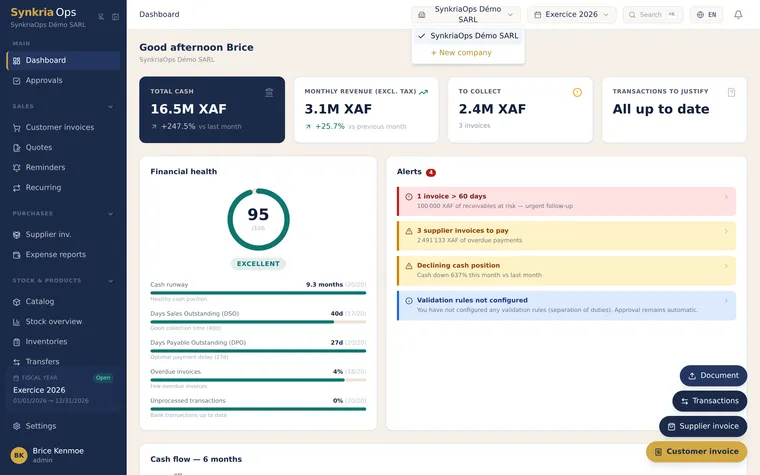
Section titled “Switch the active tenant”At the top left of the header, the tenant switcher displays the name of the active tenant (e.g. Synkria Demo SARL). If you manage multiple companies or are attached to several cabinet tenants:
- Click the tenant name to open the list.
- Select another tenant — the page reloads in the new context.
- Data is strictly isolated: you never see entries from another tenant.
Navigate between modules with the sidebar
Section titled “Navigate between modules with the sidebar”The left sidebar lists modules by category. It collapses to icons on small screens.
| Section | Included modules |
|---|---|
| Dashboard | Summary view: KPIs, alerts |
| Accounting | Chart of accounts, journals, vouchers, general ledger, trial balance |
| Sales | Quotes, customer invoices, payment reminders |
| Purchases & expenses | Supplier invoices, expense reports |
| Banking & treasury | Bank accounts, Mobile Money statements, cash flow forecast |
| Counterparties & products | Customers, suppliers, product catalogue |
| Exports & reports | FEC, SYSCOHADA financial statements, Excel exports |
| Settings | Team, VAT, journals, security |
The active section is highlighted. Click a category to expand it.
Read the dashboard and its real-time KPIs
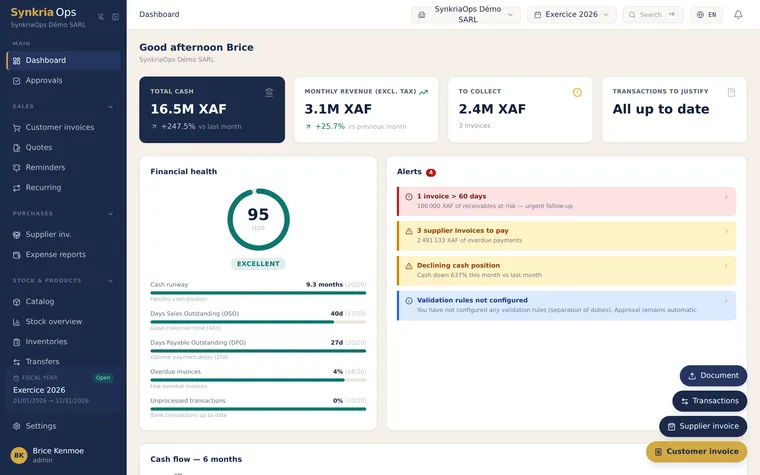
Section titled “Read the dashboard and its real-time KPIs”The dashboard is the home page for each tenant. It displays the key indicators for the current fiscal year.
Displayed indicators
Section titled “Displayed indicators”| KPI | Description |
|---|---|
| Revenue | Total sales recorded (account 70x) since the start of the fiscal year |
| Available cash | Balance of bank accounts (521xxx) + Mobile Money |
| Overdue invoices | Total amount of overdue customer receivables (411xxx) |
| Month’s expenses | Total current expenses (60x, 61x, 62x) over the rolling month |
| Estimated profit | Revenue minus expenses, excluding closing entries |
| Alerts | Invoices overdue > 30 days, unconfigured fiscal year, pending reconciliation |
Concrete example: if your tenant records 4,500,000 XAF in sales in January and 1,200,000 XAF in expenses, the estimated profit displays +3,300,000 XAF in real time as soon as vouchers are validated.
Alerts and quick actions
Section titled “Alerts and quick actions”The alerts zone flags:
- Customer invoices overdue for more than 30 days with the total exposed amount.
- Pending bank reconciliation if a statement has been imported without being reconciled.
- Fiscal year not created for the current year.
Each alert provides a direct link to the corrective action.
Save time with keyboard shortcuts
Section titled “Save time with keyboard shortcuts”| Shortcut | Action |
|---|---|
G + D | Go to dashboard |
G + P | Go to chart of accounts |
G + J | Go to journals |
N | Create a new accounting voucher (when in the Accounting module) |
Esc | Close a side panel or modal |
/ | Open global search |
Choose light or dark mode
Section titled “Choose light or dark mode”SynkriaOps automatically adapts to your operating system theme. To force it manually:
- Click your avatar in the top right of the header. 2. Select Preferences → Theme. 3. Choose Light, Dark or System (automatic).
Your choice is saved per browser and per user account.
Customize the display
Section titled “Customize the display”List columns
Section titled “List columns”In the Vouchers, Invoices and Counterparties modules, you can reorganize and hide columns:
- Click the Columns icon (top right of the list). 2. Check/uncheck the desired columns. 3. Drag and drop to reorder.
Display density
Section titled “Display density”From Preferences → Display, choose between:
- Compact: more visible rows, suited for large screens.
- Comfortable: generous spacing, ideal on tablets or for new users.
Language
Section titled “Language”SynkriaOps is available in French and English. To switch:
- Click your avatar → Preferences → Language. 2. Select Français or English. 3. The interface switches immediately — the chart of accounts remains bilingual.