Managing accounting journals
By the end of this guide, you will know how to pick the right journal for each
transaction among the 5 standard journals (VTE, ACH, BNQ, OD, AN) and how to add
an extra bank journal. An accounting journal is a chronological register
that groups vouchers of the same type of transaction and determines the
numbering prefix of vouchers (e.g. VTE-2026-000001).
The 5 automatically created journals
Section titled “The 5 automatically created journals”When your company file is created, SynkriaOps automatically generates these five journals:
| Code | Name | Role | Numbering example |
|---|---|---|---|
| VTE | Sales journal | Customer invoices, credit notes | VTE-2026-000001 |
| ACH | Purchases journal | Supplier invoices, expense reports | ACH-2026-000042 |
| BNQ | Bank journal | Bank receipts and disbursements | BNQ-2026-000015 |
| OD | Miscellaneous operations journal | Corrections, payroll, depreciation, accruals | OD-2026-000007 |
| AN | Opening balances journal | Carry-forward of prior-period balances | AN-2026-000001 |
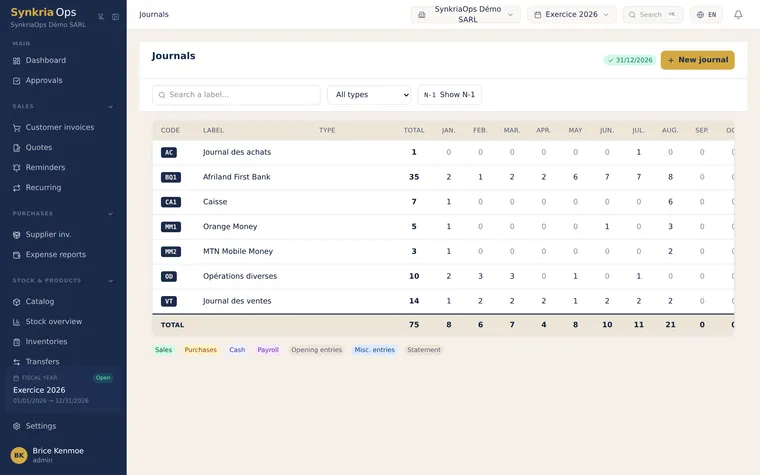
Detail of each journal
Section titled “Detail of each journal”The VTE journal receives all sales transactions towards your customers:
- Customer invoices (debit 411xxx / credit 701000 + 4431 Output VAT)
- Credit notes on sales (reverse entry)
- Cash receipts if no separate bank journal is used (not recommended)
Example: service sale XAF 1,500,000 excl. VAT + 19.25% VAT = XAF 288,750 → total customer receivable XAF 1,788,750.
The ACH journal receives all purchase transactions from your suppliers:
- Supplier invoices (debit 601000 + 4452 Input VAT / credit 401xxx)
- Internal expense reports
- Credit notes received from suppliers
Example: office supplies invoice XAF 250,000 excl. VAT + 19.25% VAT = XAF 48,125 → total supplier payable XAF 298,125.
The BNQ journal records movements on the bank account:
- Collection of customer invoices (debit 521001 / credit 411xxx)
- Payment of supplier invoices (debit 401xxx / credit 521001)
- Wire transfers, bank charges, interest
This is the journal where you post bank reconciliation entries against your bank statement.
The OD journal is the all-purpose journal for operations that do not fall under sales, purchases, or banking:
- Payroll and social charges
- Depreciation allowances (debit 681xxx / credit 281xxx)
- Year-end accruals and adjustments
- Contra-entries for correcting validated vouchers
- Internal transfers (between cash registers)
The AN journal is exclusively reserved for accounting carry-forward: it receives the opening balances from the previous fiscal year.
- Used once per fiscal year, at the beginning
- AN vouchers cannot be created if subsequent entries already exist on the same accounts
- After carry-forward, this journal remains empty until the next fiscal year opening
Adding a second bank journal
Section titled “Adding a second bank journal”If your company has multiple bank accounts (main bank + secondary bank, or an FCFA account + an Orange Money account), it is best practice to create a separate journal for each account.
-
Go to Accounting → Journals → New journal.
-
Choose the type
Bank. -
Enter a short unique code (e.g.
BNQ2,BGFI,UBA). -
Fill in the name (e.g.
BGFI Bank — Current account) and the associated treasury account (e.g.521002 BGFI Bank). -
Click Save. The journal is immediately available in voucher entry.
Which journal to use? Summary table
Section titled “Which journal to use? Summary table”| Transaction | Recommended journal |
|---|---|
| Invoice issued to a customer | VTE |
| Credit note granted to a customer | VTE |
| Invoice received from a supplier | ACH |
| Internal expense report | ACH |
| Collection of an invoice (incoming wire) | BNQ (or BNQ2 depending on the bank) |
| Payment of a supplier invoice | BNQ |
| Monthly payroll | OD |
| Depreciation allowance | OD |
| Contra-entry / correction | OD |
| Opening balances (carry-forward) | AN |
FEC export and journal codes
Section titled “FEC export and journal codes”The FEC (Fichier des Écritures Comptables) is the statutory tax export. Each entry line in the FEC file includes the journal code (JournalCode field in the FEC standard). The journal codes you define in SynkriaOps appear verbatim in the export.
If you plan to rename or change journal codes after validation, be aware that historical FEC exports may already use the old codes. For audit purposes, it is best to keep journal codes stable once in production use.