Contacts & Products
The Contacts & Products module is SynkriaOps’s central reference repository: it holds your customers, suppliers, employees, and your product and service catalogue. In SYSCOHADA revised 2019 (Plan Comptable OHADA — OHADA Chart of Accounts), each contact has a dedicated accounting sub-account: customers get a 411xxxxx account, suppliers a 401xxxxx, and employees a 422xxxxx. These sub-accounts are the foundation of individual tracking and payment reconciliation (lettrage — account reconciliation).
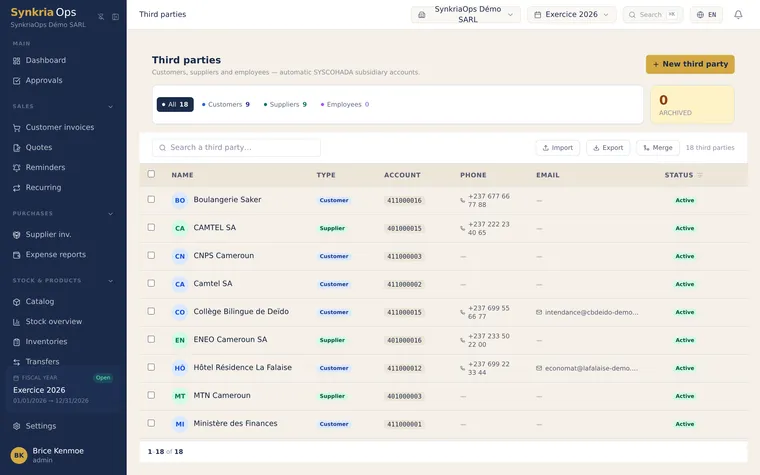
Creating a contact and its SYSCOHADA sub-account is an atomic transaction: both are created simultaneously, or neither is. There is no contact without a sub-account, and no orphaned sub-account. Numbering is automatic and sequential — you cannot choose the number manually, which guarantees no duplicates in the chart of accounts. Archiving a contact deactivates its sub-account and blocks any new entry, while preserving the complete accounting history.
The product catalogue is the library of reusable items in your quotes and invoices. Each product carries a price excl. VAT in XAF, a VAT rate, and an associated SYSCOHADA account (70x sales, 60x purchases). When you select a product in a quote, the price, VAT, and accounting account are filled in automatically — speeding up entry while ensuring correct accounting allocation from the moment the document is created.
Contact lifecycle
Section titled “Contact lifecycle”Create contact → SYSCOHADA sub-account created automatically ↓ Used in quotes/invoices → Entries recorded on sub-account ↓ Archive contact → Sub-account deactivated (history preserved)Before you start
Section titled “Before you start”To use the Contacts & Products module, make sure that:
- The SYSCOHADA chart of accounts is configured (Settings → Chart of accounts) — required for automatic assignment of 411xxx, 401xxx, 422xxx sub-accounts
- If migrating from another software, prepare your CSV files using the SynkriaOps template available in each import section
Available guides
Section titled “Available guides”SYSCOHADA contact numbering
Section titled “SYSCOHADA contact numbering”The sub-account structure follows the OHADA Chart of Accounts (Plan Comptable OHADA) revised 2019 hierarchy:
| Contact type | Root account | Sub-account format | Example |
|---|---|---|---|
| Customer | 411000 | 411xxx | 411025 |
| Supplier | 401000 | 401xxx | 401008 |
| Employee | 422000 | 422xxx | 422003 |
The sequential number is assigned by the system — you cannot modify it. Each sub-account is unique across your entire chart of accounts.
Where to start?
Section titled “Where to start?”The most common action is creating a customer before issuing a quote or invoice:
- Create a customer — most common action, required before any quote
- Create a supplier — required before recording a supplier invoice
- Create a product or service — populate the catalogue to speed up line entry
If you have an existing list of customers or suppliers to import, go directly to the CSV import section in each guide — bulk import is the fastest way to get started on SynkriaOps.