Understanding sales statuses
By the end of this article, you will know how to read the status of a quote or invoice, which actions are available at each stage, and how to move a document toward its final state.
Quote statuses
Section titled “Quote statuses”| Status | Description | Accounting entry | Available actions |
|---|---|---|---|
| DRAFT | Being written, not sent | None | Edit, Delete, Send |
| SENT | Transmitted to customer by email | None | Mark accepted, Mark refused, Follow up |
| ACCEPTED | Customer confirmed | None | Convert to invoice, Duplicate |
| REFUSED | Customer declined | None | Duplicate, Archive |
| EXPIRED | Validity date passed | None | Duplicate and update |
| CONVERTED | Invoice created from this quote | Created on invoice | View associated invoice |
Quote lifecycle
Section titled “Quote lifecycle”DRAFT ──→ SENT ──→ ACCEPTED ──→ CONVERTED │ ├──→ REFUSED ──→ (archived) │ └──→ EXPIRED ──→ (duplicate)Customer invoice statuses
Section titled “Customer invoice statuses”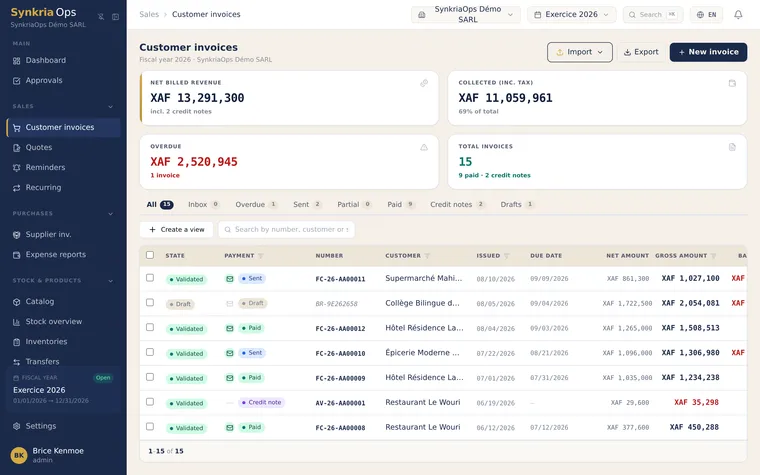
| Status | Description | Accounting entry | Available actions |
|---|---|---|---|
| DRAFT | Invoice not yet validated | None | Edit, Delete, Validate |
| SENT | Validated, sent to customer | Created (debit 411, credit 70x + 4431) | Record payment, Send reminder |
| AWAITING PAYMENT | Validated, due date not passed | Created | Record payment, Send reminder |
| PARTIALLY PAID | Partial payment received | Created + partial payment | Record balance, Send reminder |
| SETTLED | Fully paid | Complete (matching closed) | Export, Archive |
| CANCELLED | Cancelled by credit note | Credit note generated (reversal) | View associated credit note |
Invoice lifecycle
Section titled “Invoice lifecycle”DRAFT ──→ SENT ──→ AWAITING ──→ PARTIALLY PAID ──→ SETTLED │ └──→ CANCELLED (via credit note)Allowed transitions — business rules
Section titled “Allowed transitions — business rules”Quotes: allowed transitions
Section titled “Quotes: allowed transitions”| From | To | Condition |
|---|---|---|
| DRAFT | SENT | Click “Send by email” |
| SENT | ACCEPTED | Confirm customer agreement |
| SENT | REFUSED | Confirm customer refusal |
| SENT | EXPIRED | Expiry date passed (automatic) |
| ACCEPTED | CONVERTED | Click “Convert to invoice” |
| REFUSED / EXPIRED | → | Duplicate only (no reverting) |
Invoices: allowed transitions
Section titled “Invoices: allowed transitions”| From | To | Condition |
|---|---|---|
| DRAFT | SENT | Validate the invoice |
| SENT | AWAITING | Delay since sending (automatic) |
| AWAITING | PARTIALLY PAID | Record a partial payment |
| PARTIALLY PAID | SETTLED | Record balance (full matching) |
| SENT / AWAITING | CANCELLED | Issue a credit note (reversal) |
CANCELLED invoice vs Credit note — accounting difference
Section titled “CANCELLED invoice vs Credit note — accounting difference”These two concepts are related but distinct:
The original invoice moves to CANCELLED status. A credit note is automatically created to reverse the initial entry:
| Account | Description | Debit | Credit |
|---|---|---|---|
| 706000 | Service (credit note) | 1 200 000 | |
| 4431 | VAT collected (credit note) | 231 813 | |
| 411001 | Customer (reversal) | 1 431 813 | |
| Totals Balanced entry | 1 431 813 | 1 431 813 XAF | |
The customer 411xxx account is settled. If a payment had already been received, it must be refunded.
A credit note can be issued for part of the invoice (discount granted after the fact, partial dispute). The original invoice remains active but its balance is reduced. The entry is identical but for the partial amount only.
Automatic archiving of expired quotes
Section titled “Automatic archiving of expired quotes”SynkriaOps automatically processes quotes whose expiry date has passed:
- The status changes to EXPIRED on the night following the expiry date
- The quote no longer appears in the main list (filtered to active statuses)
- It remains accessible via the Expired filter or by number search
To reactivate an expired quote: open it → Duplicate → update the expiry date and amounts if needed → resend to the customer.
Actions by status — summary table
Section titled “Actions by status — summary table”| Action | DRAFT | SENT/AWAITING | PARTIAL | SETTLED | CANCELLED |
|---|---|---|---|---|---|
| Edit | ✓ | — | — | — | — |
| Delete | ✓ | — | — | — | — |
| Send email | ✓ | ✓ | ✓ | — | — |
| Record payment | — | ✓ | ✓ | — | — |
| Issue credit note | — | ✓ | ✓ | ✓ | — |
| Send reminder | — | ✓ | ✓ | — | — |
| Export PDF | ✓ | ✓ | ✓ | ✓ | ✓ |
See also
Section titled “See also”- Creating a quote — draft and send a professional quote
- Creating a customer invoice — issue a direct invoice or from a quote
- Automatic payment reminders — configure follow-up for unpaid invoices
- Validating and reversing an entry — understand credit notes and reversals