Viewing the general ledger
This guide shows you how to view the general ledger — the chronological detail of every entry on an account, with the running balance after each movement — to trace the origin of a discrepancy, justify a balance and export the result. It is the reference register of your accounting.
Accessing the general ledger
Section titled “Accessing the general ledger”From the navigation bar: Accounting → General Ledger.
On opening, SynkriaOps displays the general ledger for the first account in your chart of accounts for the current fiscal year. You can immediately refine the display using the filters.
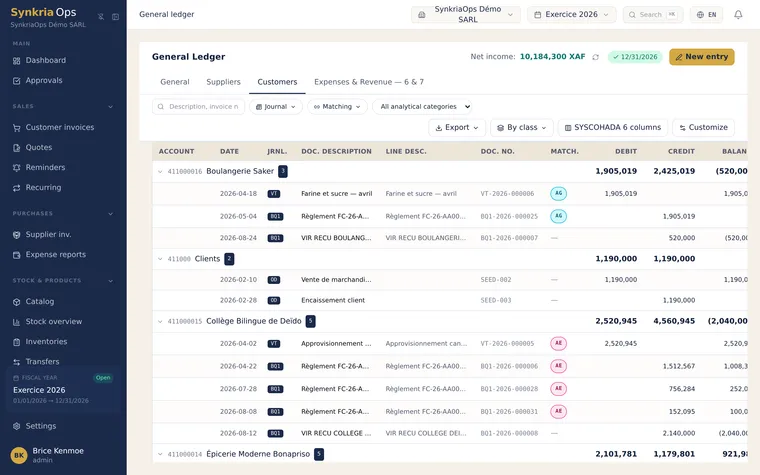
Filtering the entries
Section titled “Filtering the entries”| Filter | Available values | Typical use |
|---|---|---|
| Account | Number or label (e.g. 411001, Trade receivables) | Zoom into a specific third party or expense account |
| Fiscal year | List of open and closed fiscal years | Compare year N vs. year N-1 |
| Period start | Date in DD/MM/YYYY format | Isolate a month or quarter |
| Period end | Date in DD/MM/YYYY format | Same |
| Journal | ACH, VTE, BQ, OD, AN… | View only year-end adjustment entries |
Reading a general ledger line
Section titled “Reading a general ledger line”Each line corresponds to one accounting entry (debit or credit on this account):
| Column | Meaning |
|---|---|
| Date | Entry date (document date, not input date) |
| Description | Description of the transaction (e.g. Invoice FAC-2026-0042 SARL ABC) |
| Document reference | Source document number (clickable → opens the document) |
| Debit | Amount debited to this account in XAF |
| Credit | Amount credited to this account in XAF |
| Running balance | Cumulative balance after this entry (positive = debit balance, negative = credit balance) |
The final balance shown at the bottom of the table is the account balance at the period end date of your filter. This figure must match the balance shown in the trial balance for the same account and period.
Working through practical cases
Section titled “Working through practical cases”Tracing a discrepancy on customer SARL ABC (411001)
Section titled “Tracing a discrepancy on customer SARL ABC (411001)”Your customer SARL ABC disputes an invoice. You filter:
- Account:
411001 - Period start:
01/01/2026 - Period end:
31/03/2026
The ledger shows:
| Date | Description | Reference | Debit | Credit | Running balance |
|---|---|---|---|---|---|
| 05/01/2026 | Invoice FAC-2026-0001 | FAC-2026-0001 | 590,000 | — | 590,000 |
| 20/01/2026 | Cheque payment | BQ-2026-0012 | — | 590,000 | 0 |
| 14/02/2026 | Invoice FAC-2026-0018 | FAC-2026-0018 | 1,180,000 | — | 1,180,000 |
| 01/03/2026 | Advance transfer | BQ-2026-0041 | — | 300,000 | 880,000 |
Final balance: 880,000 XAF debit — SARL ABC still owes you 880,000 XAF. You can click FAC-2026-0018 to open the document and verify the details.
Reconciling bank account 521001 with your bank statement
Section titled “Reconciling bank account 521001 with your bank statement”Filter account 521001 for January 2026. Each line corresponds to an accounted banking transaction. The sum of debits minus the sum of credits should match the movements on your bank statement for the same period. A discrepancy indicates a missing entry or an incorrect amount.
Filtering by analytical code
Section titled “Filtering by analytical code”If you use analytical codes (cost centres, projects), you can filter the general ledger by analytical code to see only the entries linked to that centre. This filter adds to the standard filters (account, period, journal).
Example: filtering all expenses (6xxxxx) linked to analytical code PROJ-BUILDING-2026 gives you the complete analytical cost for the project.
Exporting the general ledger
Section titled “Exporting the general ledger”-
Apply your filters (account, period, journal).
-
Click Export → Excel in the top right.
-
An
.xlsxfile is downloaded with all visible columns plus the running balance. -
Open it in Excel or LibreOffice Calc for further analysis.
-
Apply your filters.
-
Click Export → PDF.
-
A formatted PDF (company header, period, account) is generated and downloaded.
-
This PDF can be sent directly to an auditor or your accountant.
Fixing common errors
Section titled “Fixing common errors”| Error | Likely cause | Solution |
|---|---|---|
| General ledger is empty for an account | No entries on this account in the filtered period | Check the period filter or look at a previous fiscal year |
| Final balance differs from trial balance | Different period filter between the two views | Use the same end date in both screens |
| An entry is missing | The document is in DRAFT status | Post the document for it to appear |
| Document reference not clickable | Document deleted or from an old closed fiscal year | Access the document from the accounting documents history |
See also
Section titled “See also”- Viewing the trial balance — Summary view of all accounts to check the overall balance.
- Matching third-party accounts — Match debits and credits in your 411/401 accounts to identify unpaid items.
- Exporting the FEC — Full regulatory export of all entries for tax audit or external review.