Tracking cash flow forecasts
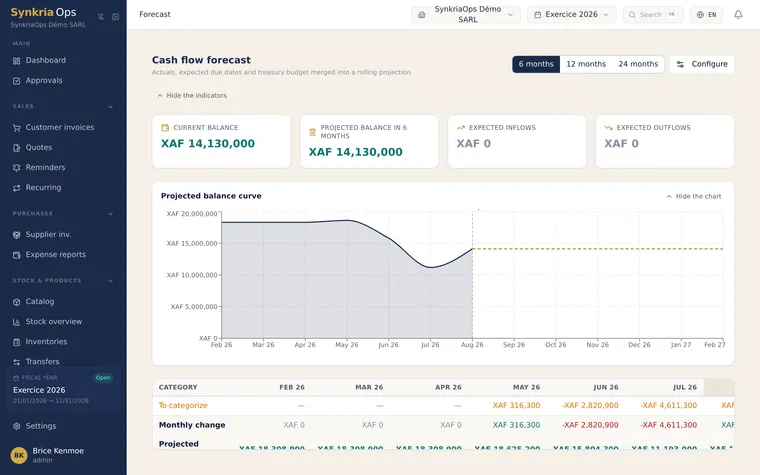
SynkriaOps’s cash flow forecast gives you a projected net cash balance curve over the next 3, 6 or 12 months, built automatically from data already entered: outstanding invoices, repayment schedules, recurring invoices. It lets you anticipate cash shortfalls before they become crises.
Accessing the cash flow forecast
Section titled “Accessing the cash flow forecast”Two access points:
-
Dashboard → Cash flow forecast widget (quick 3-month view).
-
Banking & treasury → Cash flow forecast (full view with filters, flow details and manual cash flow entry).
What the curve shows
Section titled “What the curve shows”The forecast curve represents the day-by-day evolution of the net cash
balance over the selected period. It is built from the current actual balance
of accounts 521xxx (banks) and 571xxx (petty cash), to which SynkriaOps
adds or subtracts each expected cash flow.
| Color zone | Meaning |
|---|---|
| Green | Positive balance — surplus cash |
| Orange | Positive balance but below your configurable alert threshold |
| Red | Negative projected balance — critical cash tension |
Sources of forecast data
Section titled “Sources of forecast data”SynkriaOps automatically feeds the forecast with four categories of cash flows:
1. Outstanding customer invoices (expected receipts)
Section titled “1. Outstanding customer invoices (expected receipts)”All customer invoices with status OUTSTANDING or PARTIALLY_PAID
are projected at their due date:
- Invoice
FC-2026-0148— Client ABC SARL —2,850,000 XAF— due 15/06/2026 → projected as a receipt on 15/06/2026.
2. Supplier invoices to pay (expected disbursements)
Section titled “2. Supplier invoices to pay (expected disbursements)”All supplier invoices with status TO_PAY are projected at their due date:
- Invoice
FF-2026-0089— Supplier XYZ —1,200,000 XAF— due 05/06/2026 → projected as a disbursement on 05/06/2026.
3. Scheduled recurring invoices
Section titled “3. Scheduled recurring invoices”Active recurring invoices (received rents, customer subscriptions) automatically generate their future occurrences in the forecast.
4. Loans and repayment schedules
Section titled “4. Loans and repayment schedules”Loan repayments entered in Banking & treasury → Repayment schedules are projected at each monthly due date.
Customizing the projection period
Section titled “Customizing the projection period”-
In Banking & treasury → Cash flow forecast, click the period selector at the top right.
-
Choose 3 months, 6 months or 12 months.
-
The curve recalculates instantly.
Identifying foreseeable cash shortfalls
Section titled “Identifying foreseeable cash shortfalls”-
Look for red zones on the curve — they indicate days when the projected balance is negative.
-
Click any point on the curve to see the detail of that day’s flows: expected receipts, scheduled disbursements, cumulative balance.
-
For critical weeks, consult the Upcoming flows table at the bottom of the page: flows sorted chronologically by date.
Example of an identifiable shortfall
Section titled “Example of an identifiable shortfall”| Date | Flow | Amount XAF | Cumulative balance |
|---|---|---|---|
| 01/06/2026 | Opening balance | — | 8,400,000 |
| 05/06/2026 | − Loan repayment BCA | −1,500,000 | 6,900,000 |
| 05/06/2026 | − Supplier invoice GPC | −1,200,000 | 5,700,000 |
| 10/06/2026 | − Salaries (via expense reports) | −3,800,000 | 1,900,000 |
| 15/06/2026 | + Client ABC SARL | +2,850,000 | 4,750,000 |
| 20/06/2026 | − Office rent | −950,000 | 3,800,000 |
In this example the balance stays positive, but drops to 1,900,000 XAF on
10 June. An unexpected invoice could push it below zero.
Preventive actions
Section titled “Preventive actions”When you identify a foreseeable shortfall, several levers are available:
| Action | How to act in SynkriaOps |
|---|---|
| Accelerate customer follow-ups | Sales → Automatic reminders — trigger urgent reminders on invoices near due date |
| Negotiate a supplier extension | Edit the due date of the relevant supplier invoice |
| Arrange short-term financing | Add a manual incoming flow (see below) |
| Defer a planned investment | Delete or shift the corresponding manual flow |
Adding one-off manual flows
Section titled “Adding one-off manual flows”For one-off flows not covered by the automatic categories (planned investment, asset sale, expected grant):
-
In Banking & treasury → Cash flow forecast, click Add a manual flow.
-
Enter:
- Description: e.g.
MINPMEESA grant — file 2026-04 - Expected date: e.g.
15/07/2026 - Type:
ReceiptorDisbursement - Amount: e.g.
5,000,000 XAF - Treasury account:
521100 — Afrilandor521500 — Orange Money
- Description: e.g.
-
Click Add. The curve recalculates immediately.
Forecast limitations
Section titled “Forecast limitations”- Unrecorded invoices: if an order is confirmed but the invoice not yet created, the flow is not included.
- Customer payment behaviour: the forecast projects at the contractual due date, not at actual payment behaviour. A habitually late customer will still defer actual receipts.
- XAF/currency fluctuations: if you have transactions in EUR or USD (rare under OHADA but possible with international partners), amounts are converted at the entry-date rate without automatic revaluation.