Fixed assets & depreciation
A fixed asset (immobilisation) is a durable good (software, land, building, equipment, vehicle, furniture) that your company uses across several fiscal years. Its value is spread over time through depreciation (amortissement). By the end of this page, you will know where the module is, what each tab contains and in which order to handle an asset, from purchase to disposal.
Prerequisites
Section titled “Prerequisites”- An open fiscal year: an asset belongs to the fiscal year of its acquisition, and no operation is accepted on a closed fiscal year.
- The Administrator, CFO or Accountant role to create, edit or generate depreciation. The Auditor role views the register without changing it.
- Disposing of an asset (sale or write-off) is reserved for the Administrator and CFO roles; deleting a record, for the Administrator role.
Where to find the module
Section titled “Where to find the module”Menu Assets → Fixed assets. The page has five tabs:
| Tab | What it contains |
|---|---|
| Assets | The register: indicators (gross value, accumulated depreciation, net book value, period depreciation), search, filters, columns, and the Export, Import, Generate depreciation and New buttons. |
| Global plan | For the chosen fiscal year, each asset with its gross value, the period depreciation, the cumulative depreciation and the NBV (net book value). |
| Reconciliation | The match between the register and the general ledger, account by account. |
| Import | Bulk import of an existing asset base from a CSV or XLSX file. |
| Statistics | The fiscal year’s indicators and the breakdown of assets by category. |
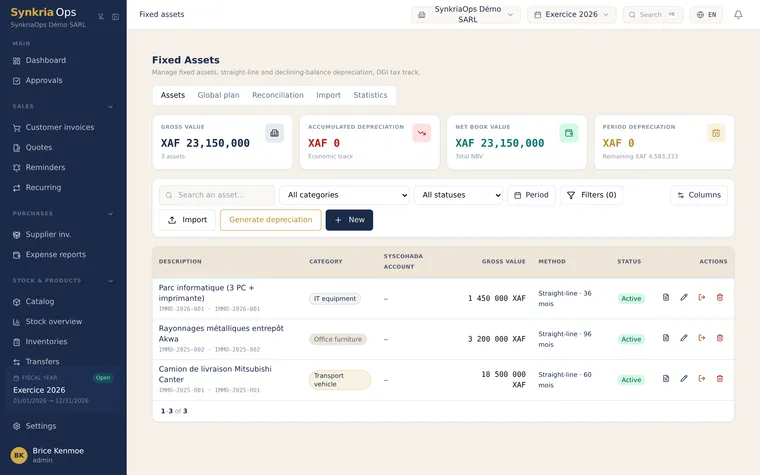
Clicking a row opens the asset’s record full screen, with its Identification, Depreciation, Journal entries, Assignment, Attachments, History and Comments tabs.
An asset’s life cycle
Section titled “An asset’s life cycle”| Status | Meaning |
|---|---|
| Under acquisition | Asset created in the “Asset under construction” category (account 23). It is not depreciated until it is put into service. |
| To complete | Record created quickly from an accounting voucher, or recovered from an imported general ledger. It has no depreciation schedule and generates no depreciation. |
| Active | Asset in service, with its depreciation schedule. |
| Disposed | Asset sold: removed from the company’s assets, the record can no longer be edited. |
| Written off | Asset destroyed or taken out of use: removed from the company’s assets, the record can no longer be edited. |
Entries produced by the module
Section titled “Entries produced by the module”Putting into service, depreciation, disposals, impairments and acquisitions recorded without a supplier are posted to a dedicated journal, the Fixed assets journal (code IMM). SynkriaOps creates it at the first operation. An acquisition recorded with a supplier creates a supplier invoice, posted to the purchases journal.
These entries are posted as soon as they are created. To correct one, you cancel it with a cancellation entry; it is never edited or deleted.